Skip to content
"VC3 has made it easier than ever before for our local government to serve our citizens by providing us with modern web tools and a team
of talented and courteous professionals.
City of Valdosta, GA

2025 Managed IT Services Cost & Pricing Guide

You’ve probably heard about how managed IT services saves businesses money and are wondering if that’s possible for your organization too. This guide will help walk you through different pricing strategies and costs you can expect.

Top-Six-IT-Budgeting-Mistakes-Image

Guide to Municipal IT Budget Planning

Learn about the components of an IT budget, essential cybersecurity line items, why you should take a risk-based budgeting approach, and how AI is impacting municipal technology. 

Information technology and cybersecurity are a critical part of a municipality’s annual spending. It’s important for towns and cities to flesh out a fairly detailed IT budget to help uncover inefficiencies, save money, stay secure and compliant, and better execute operational goals.

Most municipalities lack detailed IT budgets for a few reasons:

financial-services

managed-services

IT lumped into a single line item

The entirety of a municipality’s IT sometimes appears as a single line item such as “computers” or “technology.” This categorization oversimplifies IT and misses important items.

Team

Team

IT spread across different departments

While a department may very well oversee its own IT budget, many municipalities centralize technology. By spreading IT and cybersecurity line items across departments, you lose insight into your overall IT assets and investments.

Application Development

Blog-article

Incorrect labeling of IT

Some municipalities mislabel IT, categorizing it as “office supplies” or “professional fees.” When mislabeled, you lose visibility into your IT investments.


 → 4 Keys to a Smarter IT Budget [Free IT Budget Template]

While you don’t necessarily have to create an extremely detailed IT budget, there are certain components that should be present— even for a small municipality. Even if you need to code your municipal IT budget in a specific way, you can still use the following components for planning purposes and when presenting your IT budget to others for review. 

What's Inside this Municipal IT Budget Planning Guide?

  • 1
    Components of an IT Budget
  • 2
    IT Budgeting Categories
  • 3
    Risk-Based Approach to IT Budgeting
  • 4
    Let Technology Spur Your Vision
  • 5
    Unique IT Budgeting Items for Police, Fire, and Water/Sewer Departments
  • 6
    Presenting to Council: Connecting the Non-Technical to the Technical
  • 7
    IT Budgeting Examples and Formats
  • 8
    How Municipalities Are Adding AI to Budgets

Short on Time? Download the PDF ⬇️
IT Budgeting Guide Cover


Components of an IT Budget

The following components constitute the basic elements of an IT budget. They can scale up or down based on your complexity. Because IT and cybersecurity are so technical, we’ve also provided brief definitions and descriptions to clarify each component.

Types


Hardware

Hardware includes any IT-related equipment that you purchase along with related installation, support, warranties, etc. Line items may include:

  • Servers: A server is a special, dedicated computer with the sole purpose of running important software and applications. Usually, servers are monitored and maintained by IT professionals. You may also have data backup servers.
  • Endpoints: Endpoints include all desktop computers, laptops, tablets, and mobile devices. Some municipalities may also want to break down endpoint components such as the PC, monitor, keyboard, etc.
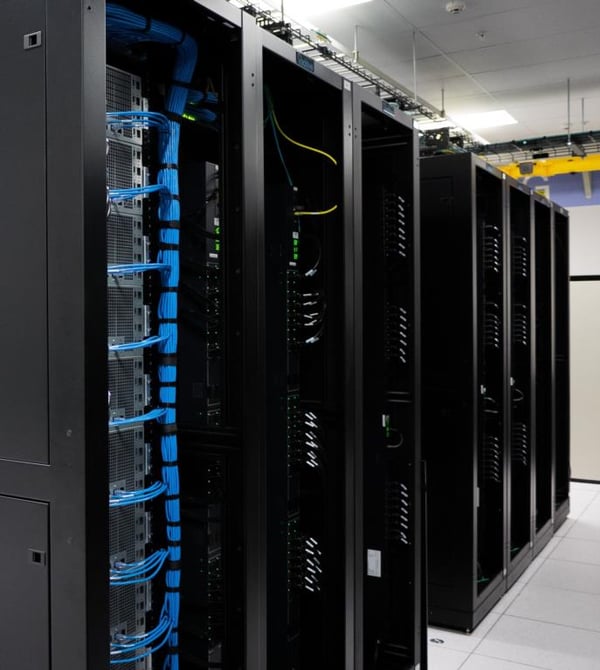
Servers-imgix-391808-unsplash-LogoRemoved-2


  • Network Infrastructure: To connect your servers and devices together while also allowing access to the internet, you need many network infrastructure components depending on your complexity. Some of those components may include:
    •  LAN / WAN: A local area network (LAN) connects devices within a single building or limited area.  A wide area network (WAN) connects multiple LANs, commonly spanning buildings and geographical locations.
    • Racks: Racks hold hardware equipment such as servers, routers, switches, etc.
    • Switches: When your municipality has many computers and servers, a switch is like a “Grand Central Station” for your network. Like a busy airport directing flights, a switch directs information and data in an efficient way to each computer and server.
  • Routers: Your municipality might have multiple networks. For example, city hall may have one network with its own computers, servers, and switches. The police department may have its own separate network. A router helps these different networks communicate with one another as well as connect your networks to an additional global network—the internet. 
  • UPS and UPS batteries: These are devices and batteries that power your servers, devices, and networking equipment in case of a power failure.
  • Storage: In some cases, you may budget for specialized storage equipment such as controllers (which help manage the physical storage on drives) and drives (which store data). The reason you may budget separately for this hardware is if you have needs that require you to invest in a lot of extra storage space, or if you use an onsite data backup solution.
  • Printers, Scanners, and Other Electronic Office Hardware: Because so much basic office hardware requires connections to servers and computers, it’s recommended to budget this  equipment under IT.
  • Data Centers: Some municipalities have their own data centers and need to account for items such as leasing for the physical space, power, and cooling.
  • Telecommunications: Includes expenses such as internet connectivity and phone systems. Some municipalities have their own telecommunications infrastructure, which can include traditional or VoIP hardware.

A Note on Cloud Hardware 

While the cloud can remove the need for some or all of your onsite hardware, you will still need virtual hardware that sits in the cloud. Costs associated with cloud hardware services include: 
  • Infrastructure as a Service (IaaS): You can set up virtual machines (such as servers) and networking infrastructure in the cloud. 
  • Storage: You can pay for storing data and files in the cloud. 
  • Integration: You may have expenses related to integrating cloud services with existing on-premises systems or other cloud services, including middleware and integration tools. 

Software

Software (also often interchangeable with the term “applications”) includes licenses, subscriptions, and any related training,
support, and maintenance. You can divide software into the following three components:

 
Software: This is software purchased as a capital expense.
  • Client machines and workstation software: Includes software that runs on individual computers. such as productivity software. 
  • Server software:: May include operating systems, business email, databases, etc.
  • System software: May include software for remote access server connections, databases, or disaster recovery.
  • Security software: May include software such as endpoint detection and response (EDR), antispam, and other kinds of security tools.
  • Internal applications: Unique to your municipality, such applications may include financial system software, specialist software, compliance, VoIP, VPN, log management, etc.
  • Online and hosted services: May include website domain hosting, email hosting, database hosting, and other kinds of online services.

Application Licensing: Vendors require that you purchase a license that gives you permission to use a software application. Each software application listed above requires a license or subscription to use it. Licensing can include various levels such as:

  • One-time licensing: You pay one license fee and can then use the software “forever.”
  • Annual licensing: You must pay a license fee annually, renewing it every year.
  • User level licensing: Often seen with cloud applications, you only pay a fee per user.

Note that cloud software purchased through a subscription cost—such as offsite data backup services or various cloud applications (like Microsoft 365)— may not require a capital investment to purchase the software. You only pay for the subscription and access it over the internet.

Support:  All the software above, including subscription-only applications, will often include and/or require support. If it’s an extra charge, then it needs to be part of your IT budget. Such support includes infrastructure support that oversees areas such as your network infrastructure, SSL certifications, SQL servers, etc.
 

Cybersecurity 

Budgeting for cybersecurity is absolutely crucial to ensure that municipalities have the necessary resources to protect sensitive information and IT assets from cyber threats. 

Some essential IT budgeting line items for cybersecurity include: 

  • Endpoint Security: It’s important to secure endpoints (such as servers, desktop computers, and laptops) with software such as endpoint detection and response (EDR). 
  • Firewalls: A good firewall is a barrier between your internal network and untrusted external networks, such as the internet, helping prevent unauthorized access to your network. Your firewall might be onsite hardware or cloud-based. 
  • Security Awareness Training: Training programs educate employees about cybersecurity best practices, phishing awareness, and social engineering risks. 
  • Security Monitoring and Alerting: Security Information and Event Management (SIEM) solutions provide real-time analysis of security alerts generated by applications and network hardware. 
  • Third-Party Vulnerability Assessment and Penetration Testing: Regular vulnerability assessments and penetration tests identify and address potential weaknesses in your systems. 
  • Data Loss Prevention (DLP): DLP tools (such as cloud application monitoring and alerting) monitor, detect, and prevent the unauthorized access or transmission of sensitive data. 
  • Cloud Security: Includes identity and access management (IAM), encryption, threat detection, and security monitoring services to protect your cloud hardware and applications. 
  • Cyber Insurance: Cyber insurance provides financial protection in the event of a security breach or data loss. 

Personnel + Services

  • Personnel: Includes any salaries, wages, benefits, overtime, travel, training, and other personnel related costs for full- or part-time IT employees.
  • Services: Services include any service providers, consultants, and advisors helping you with IT-related matters. Areas may include:
    • Monitoring, maintaining, and managing your IT
    • Helpdesk support
    • Monitoring and maintaining data backups
    • Maintaining your website
    • Conducting audits or assessments
    • Completing specific projects
  • Training: Includes any cybersecurity and IT-related classes, programs, workshops, or certifications for municipal employees that incur a cost.

🔎 Related Resource: Hiring a Full-Time IT Employee: Not a Good Investment for Smaller Municipalities


5-myths-about-managed-it-services

A Note on Unforeseen IT Expenses 

Unforeseen information technology expenses can arise unexpectedly and impact a municipality’s budget. Many of these expenses can be avoided or mitigated with proactive IT budgeting and investments. Otherwise, your municipality may encounter unpredictable and unbudgeted expenses such as: 

  • Cybersecurity incident costs: Responding to and recovering from cybersecurity incidents (such as ransomware attacks) will likely involve forensic investigations, remediation efforts, and legal expenses. 
  • Data recovery and restoration: With data loss in the wake of a cyberattack or system failure, data recovery and restoration will likely involve hardware replacement and downtime costs. 
  • Hardware failures: Many municipalities with aging hardware often experience unplanned expenses for replacing or repairing critical hardware components that fail unexpectedly. 
  • Hourly billing from reactive IT support: If you’re using a break/fix IT vendor, you will likely experience spikes in hourly costs when they work extended hours to address urgent issues or respond to unexpected incidents. 
  • Network outages and connectivity issues: Unresolved issues with ISPs can lead to unforeseen expenses from addressing network outages or connectivity issues. 

CATEGORIES

It should be no surprise that IT budgets also separate into operational, capital, and project expenses.

Operational Costs

Operational IT costs are ongoing expenditures related to the day-to-day functioning and maintenance of IT systems and services:

  • Personnel
  • Training
  • Maintenance and support
  • Subscription-based software licensing
  • Data backup and disaster recovery
  • Cloud-based services
  • Data center leasing, power, and cooling
  • Telecommunications maintenance, support, and services
  • Consulting services
  • Any other recurring costs

Capital Costs

Capital IT costs are significant, one-time investments that may include:

  • Hardware purchases
  • System and software implementation and upgrades
  • IT infrastructure upgrades and improvements 
  • Telecommunications infrastructure
  • Technology growth
  • Security enhancements


Projects

Projects may have both capital and operational expenses attached to them, based on the type and complexity of the project. We recommend carving out projects using the same components above by:

  • Deciding which parts of the project involve capital versus operational
    expenses.
  • Detailing all components of the project.
  • Breaking out projects as a separate line item in your IT budget.


Consider a Risk-Based Approach to IT Budgeting 

Instead of viewing your IT budget as a list of random components, it’s helpful to look at it through a risk-based lens. Risk-based budgeting prioritizes and allocates resources based on an assessment of potential risks and the strategies needed to mitigate them. 

With a risk-based approach, you examine your current IT budget to see if you’re: 

  • Underinvesting in important cybersecurity measures that help you protect sensitive information and assets, potentially leaving you wide open to a devastating cyberattack. 
  • Increasing the probability of downtime, permanent data loss, and operational system failures that negatively impact resident services and employee productivity. 
  • Threatening the success of important projects and initiatives because you don’t have basic foundational technology capabilities in place. 

To approach IT budgeting from a risk-based perspective, it’s important to take a few steps to make sure your dollars are prioritized for maximum impact. 

  • Conduct an assessment of your environment and infrastructure: A thorough assessment identifies potential risks such as your ability to fend off cybersecurity threats, the impact of technology obsolescence, regulatory compliance challenges, IT-related project delays, and other uncertainties. 
  • Prioritize next steps: Once risks are identified, they are assessed and prioritized based on their potential impact. Risks that pose a higher impact and likelihood receive greater attention. 
  • Allocate budget for risks and contingencies: Resources are allocated in your budget based on the prioritized risks. Areas with higher risks may receive increased budget allocations to implement preventive measures, mitigation strategies, and contingency plans. This ensures that critical areas are adequately funded to address potential challenges. 

Roadmapping is also part of the goal here. An IT budget is ideally used as a way to create a long-term plan where gaps are identified, investments are prioritized for the highest-risk areas, and items are checked off starting with the most critical. 

Risk-based budgeting is an iterative process that involves continuous monitoring of risk factors and reassessment of your budget throughout the fiscal year. This enables municipalities to adapt their budgetary allocations in response to emerging risks or changing priorities. 

By integrating risk considerations into the budgeting process, municipalities can enhance their ability to anticipate, respond to, and mitigate potential challenges. This approach promotes a more resilient and adaptive IT environment aligned with your risk tolerance and strategic goals. 

To get started with a risk-based mindset, we’ve identified 5 common risks that often impact municipalities. 

misc-task-list-check-1-work-office-companies-48 2 (1)

 1. WHEN WAS THE LAST TIME I CONDUCTED AN IT ASSESSMENT OR AUDIT?

If you haven’t conducted an IT assessment or audit in quite some time, then you may want to invest in one. An IT assessment can provide you information about:

  • Adherence to IT best practices
  • Gaps and risks
  • Pressing needs
  • Assets
  • Cybersecurity and data protection
  • Policies and procedures

With an assessment in hand, you will have specific recommendations that you can act upon and an easier business case to make for investing in critical areas.

Action items:

  • Seek out experienced IT professionals or consultants to conduct an IT assessment/audit.
  • Cooperate with the assessment/audit so that the professionals are working with as much information as possible.
  • Act on the recommendations—do not sit on any high-risk areas identified in the assessment.

Data-Backup-300x300-2


2. IS MY DATA BACKUP TESTED AND OPERATIONAL?

All it takes is one data loss incident to significantly impact a municipality’s budget. If you cannot recover or use your data for days or weeks, you impact municipal operations and risk increased expenses. We find that IT costs skyrocket for towns and cities that use inadequate data backup solutions, especially when a server fails and they cannot recover the data without time-consuming, expensive help.

Your municipal IT budget will need to accommodate several data backup and disaster recovery costs and investments.

  • Hardware: Your data backup hardware will primarily consist of backup servers such as onsite servers for local backups, hosted servers in a data center, and/or virtual servers in the cloud. You may also have network-attached storage (NAS) devices (or dated technology such as external hard drives or tape drives) that serve as data backup hardware.
  • Software: You need to budget for data backup and disaster recovery software that automates and manages the backup and recovery process.
  • Cloud Storage: Part of your offsite data backup solution may include a monthly fee for sending and storing your data in the cloud. It’s important to budget for cloud storage in terms of monthly costs, especially so you can plan for your storage needs to increase over time as you create more data.
  • Network Bandwidth: You may need to budget for additional bandwidth costs to accommodate backup data transfers, especially for cloud services.
  • Maintenance and Support: Includes a backup vendor’s maintenance and technical support agreements to ensure the proper working of your data backup and disaster recovery hardware and software. You may also have a third-party vendor helping you with data backup testing, backup monitoring and alerting, and disaster recovery planning.
  • Emergency Funds: You never know when a data backup incident will occur, whether caused by a cyberattack, natural disaster, or hardware failure. Having a contingency budget to cover unforeseen expenses related to backup and disaster recovery is important, especially if your data backup solution is limited, experiences frequent issues, or is untested.

In our experience, municipalities nearly always massively underestimate the costs of recovering from a cyberattack or data loss incident. It is essential that you budget appropriately for emergency funds – especially if you don’t feel confident that your municipality follows essential cybersecurity best practices.

Action items:

  • Acquire an onsite/offsite data backup solution if you lack one. It is critical to invest in a data backup solution with an onsite and offsite component.
  • Test your data backup solution to ensure that it works and your investment will pay off in the event of an incident.
  • Account for the above costs in your IT budget, as needed, depending on the complexity of your data backup and disaster recovery solution.  
misc-desktop-monitor-lock-computers-devices-electronics-48 (1) 1 (1)


3. IS MY HARDWARE AT END OF LIFE?

Old hardware results in processing delays, server and desktop failure, and lost productivity. While you might feel you’re maximizing an investment by keeping hardware until it dies, hardware gives you significantly diminishing returns after many years—costing you money once it becomes obsolete, ineffective, and unable to meet the demands of municipal business.

Not upgrading or replacing hardware (especially with scenarios such as Windows 10 going end of life in October 2025) introduces various financial risks to your organization. Unsupported hardware:

  • Opens you up to ransomware, malware, and cyberattackers from around the world.
  • Opens the door to a wave of frozen, crashed, and slow computers.
  • Potentially puts you out of compliance, from which you can experience substantial fines or your state taking away your municipality’s access to CJIS data.
  • May not be covered by cyber insurance claims.
  • May not allow you to use newer applications.

A municipal IT budget should account for hardware maintenance, upgrades, and replacements to ensure outdated hardware does not negatively impact your operations. Make sure your budget accommodates the following:

  • Hardware Replacements: Budget for replacing outdated servers, workstations, networking equipment, and storage devices.
  • Hardware Upgrades: Budget for upgrades, such as upgrading eligible workstations from Windows 10 to Windows 11.
  • New or Upgraded Software Licenses: When you upgrade or replace hardware, you may need to budget for new or upgraded software licenses.
  • Data Migration and Backup: Budget for the cost of migrating data from old hardware to new systems while ensuring it’s backed up.
  • Extended Warranties and Support Contracts: If you stay on certain end-of-life hardware, you may need to budget for extended warranties and support contracts so that the hardware can still be maintained and made as secure as possible.
  • Third-Party Support Services: You may need to budget for a third-party to maintain and secure your legacy systems after the vendor stops supporting them.
  • Decommissioning Services: Budget for the cost of safely decommissioning and disposing of old hardware while complying with environmental regulations and standards.
  • Contingency Funds: If you do not replace your hardware on a specific timeline and let it go past end of life, then you may need to budget for unexpected costs or emergency replacements if hardware failure occurs.

Hardware as a Service (HaaS) May Be Good for Your Budget

For municipalities leaning toward as many operational expenses as possible, HaaS is a good option. With HaaS, you can access and use hardware resources without having to purchase or own the physical devices outright.

HaaS providers often refresh hardware regularly to ensure users have access to the latest technology. This means municipalities can benefit from up-to-date and more efficient hardware without worrying about the cost of purchasing new equipment.

Action items:

  • Assess the age of your hardware assets.
  • Identify any assets at or near end of life. Some common end of life risks include:
    • Windows Server 2012 (end of life now)
    • Windows 10 (end of life October 2025)
    • Windows Server 2016 (end of life January 2027)
  • Budget for upgrades and replacements—the upfront investment will eventually pay for itself through lower support costs, increased operational productivity, and less chance of sudden equipment failure.

By accounting for end-of-life costs in a municipal IT budget, you can effectively manage the transition from end-of-life hardware to new systems—ensuring minimal disruption to your operations.

VoIP-150x150

4. HAVE I RECENTLY EVALUATED OUR ISP OR TELECOM PROVIDER?

Have you used your current providers for many years? Are you locked into a multiyear contract? If so, those are clear signs that you could potentially shop around and lower your ISP/telecom costs. We’ve seen many towns and cities unknowingly suffering from poor yet expensive service, when higher quality and less expensive service exists. If you’ve neglected to examine or challenge this line item for many years, a switch in providers or a renegotiation may potentially save you money.

Action items:

  • Use IT professionals to help you shop for competitive ISP and telecom options, especially if you haven’t sourced options in a long time.
  • Use their information to see if you can reduce your costs while increasing quality of service—either through negotiating with your current provider or switching to a new provider.

Money-bill-150x150-2

5. ARE MY IT SUPPORT COSTS UNPREDICTABLE?

Many towns and cities use IT vendors or contractors that seem inexpensive on the surface but usually gouge a municipality’s
budget with expensive and unpredictable billing during the year. If your annual IT support costs are too unpredictable, you
can save money with a more efficient model that includes proactive IT support with a predictable monthly fee.

Action items:

  • Look at your IT support costs. Do they vary wildly month to month, or year to year? Are you able to predictably budget for these services?
  • If you see unpredictability, source more proactive IT support options and compare those costs—and what you’re getting—to your current IT support.
  • Consider switching to a proactive IT support model with predictable budgeting so that a variety of commonly needed services are all under one fixed cost umbrella.
Smart City

How Municipalities Are Adding AI to Budgets 

Municipalities are increasingly leveraging artificial intelligence (AI) to enhance efficiency, improve services, and address various challenges. It’s a fascinating topic, but sometimes AI can seem impractical and too cutting-edge when you hear real world examples discussed in presentations or in the media. 

To bring the discussion down to earth, we’ll address some of the common questions we hear about AI and municipal IT budgeting. 

How does AI fit into an IT budget? 

You’ll find AI increasingly embedded in the tools and platforms you already use. As a result, it is unlikely that you will need a separate AI line item or a large portion of your budget devoted to fancy AI tools. Instead, think of AI as a technology layer that touches multiple budget categories. 

For most municipalities, AI enhances existing investments across your IT infrastructure, cybersecurity tools and solutions, data management activities, and resident services. 

AI (artificial intelligence)

Some examples include: 

  • Microsoft Copilot included as part of your Microsoft 365 licensing.
  • An AI-enhanced GIS tool as part of your GIS software licensing.
  • Additional cloud computing and storage costs required to use specialized AI tools (such as for traffic analysis or water management).
  • Investments in high-speed broadband, fiber-optic networks, 5G, and network redundancy due to the large data transfers required by AI.
  • Data cleanup, maintenance, and management costs (because AI requires clean, structured data).
  • Training to get employees up to speed on AI tools and solutions.
  • Partnerships with vendors providing AI solutions.
  • Costs for outside consultants. 

In this sense, AI will not require you to create a separate budget category. However, you need to become aware how AI will impact existing IT investments. 

What AI-related investments should my municipality have in our budget? 

We are not going to recommend cutting-edge tools or expensive AI solutions. However, going into 2026, it’s important that some of your IT and cybersecurity investments leverage AI. Otherwise, you will start to fall behind, miss out on easy productivity improvements, and open yourself up to cyber threats. 

A few current baseline AI investments include: 

  • Licensing for AI-powered productivity tools: One of the most well-known AI tools that you may already have is Microsoft Copilot, part of the Microsoft 365 suite. Many other tools exist—with the paid versions giving you more flexibility and features than free ones. So many people are seeing substantial productivity improvements from these tools that this investment is a no-brainer.
  • AI-enhanced cybersecurity monitoring: Many baseline cybersecurity platforms now leverage AI to detect and respond to threats more quickly. For example, EDR is AI-driven—helping to analyze behavior patterns, detect anomalies, and quarantine threats.
  • AI-driven data analytics platforms and data governance: Many municipalities are leveraging AI to analyze large data sets to help with everything from economic development to water management. You also need data governance investments to ensure your AI tools are fed clean, secure, and ethical data.
  • Chatbots and virtual assistants for resident engagement: Another common investment is using AI-driven chatbots to help answer common resident questions and enhance your website’s responsiveness—especially if people engage with it after hours.
  • AI integrations within existing systems: Your software and application vendors may help you understand how AI can enhance their use. We’ve seen AI helping with everything from permitting applications to ERP systems.
  • Staff training on AI tools and responsible use: AI tools without people understanding how to use them are a waste of an investment. You will need to train staff so that they learn how these tools work, understand the connection to their jobs, and use AI ethically and responsibly (such as not sharing sensitive or confidential information with an AI tool unless it’s completely secure).
  • Pilot funding for AI use cases: As you identify future scenarios where you feel AI can have a huge impact, consider funding some pilot projects so that you stay ahead of the curve. For example, you may want to start a traffic optimization or water management AI pilot project. 

What does my municipality need to know right now about AI and IT budgeting? 

AI is still relatively new, with many municipalities actively experimenting and learning about it. As a result, it may seem difficult to incorporate AI into your IT budgeting strategy because there are no existing historical models. 

Like any kind of budgeting, municipalities should approach AI budgeting with a strategic mindset. Here’s what you need to know about strategic budgeting for AI right now.

  • Keep your IT budget flexible: AI is evolving so fast that emerging tools, applications, and resources pop into existence every day. As you assess ways to leverage AI, keep some flexibility in your budget—especially if an essential way to use AI appears.
  • Vet vendors carefully: AI is also in a full-on hype stage. That means many vendors and solutions exist that may not help you, are in very early stages, or are way too expensive. Not all AI solutions are created equal, so vet vendors carefully—always keeping your municipality’s business needs front and center.
  • Clean up your data: This is a good best practice anyway, but essential for AI. Without clean, structured data, many AI tools and applications are worthless. For example, Copilot has the ability to look through all your SharePoint data to answer your questions and summarize essential information. But if your data is siloed, decentralized, and a fragmented mess, then Copilot won’t work as well.
  • Be careful about introducing new risks: AI can open up an amazing world only limited by your imagination, but it also introduces serious risks. Issues with privacy are rampant—especially with people sharing sensitive and confidential information with AI applications that don’t necessarily protect that information. Bias issues—such as with public safety AI applications—can affect public trust. And AI tools are not automatically cybersecure, so you must make sure you don’t introduce new security vulnerabilities that could lead to a cyberattack. 

What are some examples showing how municipalities can use AI? 

Municipalities have explored many practical ways to use AI across various departments and services. 

  • AI Assistants: Tools such as Copilot and ChatGPT help you reduce the effects of mundane work. You can use these assistants to provide drafts of content (such as emails, website copy, social media posts, etc.), conduct research more quickly, and generate answers to common resident questions.
  • Public Safety and Emergency Response: AI is employed in public safety applications, including predictive policing for crime prevention, emergency response optimization, and analysis of social media and other data sources to identify potential threats or incidents.
  • Water Management: AI is applied to monitor and manage water distribution systems, detect leaks, and predict equipment failures. This improves water conservation, quality, and overall utility efficiency.
  • Waste Management: AI is used to optimize waste collection routes based on factors like historical data, real-time usage patterns, and environmental conditions. This helps reduce costs and minimize environmental impact. 
PoliceCar-josh-hild-8Wz-gIYEnHY-unsplash-2
power
  • Urban Planning and Development: AI is utilized in urban planning to analyze demographic data, traffic patterns, and environmental factors. This assists in making informed decisions about zoning, infrastructure development, and land use.
  • Traffic Management and Optimization: AI-powered traffic management systems analyze real-time data from cameras, sensors, and other sources to optimize traffic flow. This includes adaptive traffic signal control and dynamic routing to reduce congestion and improve transportation efficiency.
  • Energy Efficiency: AI is employed to optimize energy consumption in municipal buildings and facilities. Smart grids and AI algorithms can help manage energy distribution, reduce costs, and promote sustainability.
  • Smart Infrastructure Management: AI is used to monitor and manage infrastructure components such as roads, bridges, and utilities. Predictive analytics can help identify potential issues, allowing for proactive maintenance and minimizing downtime. 

What AI trends are coming around the corner in 2026? 

While it’s difficult to predict exactly where AI is headed in 2026, here are a few safe predications that can help you anticipate how your IT budgets may become affected next year. 

  • Expect more AI integration into municipal platforms: AI has already displayed a track record of success enhancing existing platforms (such as Microsoft 365). More AI integration will find its way into municipal software and applications such as permitting, inspections, finance, etc.
  • Expect more data-driven decision support tools: Historically, this is nothing new. You need data to make good decisions. AI just wildly accelerates the power of your data—helping summarize and analyze data more quickly in area such as budget planning, road/bridge repair, crime patterns, or economic development. Rather than replace your thinking, AI will augment it by providing insights, forecasts, and scenario modeling.
  • Regulatory scrutiny will likely increase around AI use in government: It’s inevitable that more formal oversight of AI systems is coming. In 2026, you may see emerging requirements around mandatory AI policies, AI impact assessments before deploying a tool, and public disclosure of AI use in your decision-making.
  • Expect more funding opportunities tied to AI adoption: Because municipalities often have limited resources, it’s inevitable that federal and state grants may pop up to help you fund critical AI investments tied to responsible adoption and innovation. For example, Congress is currently considering a $55 million grant program to help state and local governments build AI capacity. 

Let Technology Spur Your Vision


Many towns and cities often separate vision conversations from technology conversations. If you talk about vision without talking technology, you can create unrealistic expectations or fail to realize what’s possible. If you talk about technology without talking about vision, you can dwell too much on tactical planning or make decisions about key municipal investments that may have nothing to do with overall goals. Here are some of the highest-level and most visionary IT budgeting action items you need to consider.

Connect your municipality’s
vision with technology.

This means getting your visionaries and IT experts in
the same room together. Work
through your vision by department, and list things you want to accomplish for city hall, finance, public safety, economic development, parks and recreation, etc. It helps to set visionary goals first before
becoming limited by technology.

Create a list of projects with
options.

List specific projects that should take place over the next 3-5 years. Your IT expert should be able to assess those projects and offer options. For example, you may want an expensive accounting system that fulfills all your demands, but your IT expert provides an option that has 95% of what you want for 50% of the cost.

Don’t forget any operational goals.

When visioning for the next few years, you need to rely on IT to have a conversation about important operational goals. As technologies improve and standards continue to increase, demands on IT will grow.

Are there ways to make accounting, public safety, finance, city hall, or other departments more efficient? Do technologies exist that can help towns and cities accomplish certain tasks better?

Think about making  residents happier and more
informed.

While probably a part of your
municipality’s vision, it’s worth noting separately that resident services should always be a part of your planning. For example, think about what kinds of information towns and cities
need. Explore ways to improve your website, broadcast tools, and social media. Or think about ways to improve the online payment process and offer more resident services
online.

Residents continually demand more information, transparency, and services from towns and cities, and technology can help you keep up with making your taxpayers happy.

Unique IT Budgeting Items for Police, Fire, and Water/Sewer Departments 

Police, fire, and water/sewer departments should actively participate in municipal IT budgeting, whether they are fully integrated with city hall or function as a standalone department. Regardless of your situation, it’s important to make sure that IT investments support the particular needs of your department—from cybersecurity to replacing outdated hardware and software. 

A few important department-specific IT budgeting line items may include: 

Police 

  • Computer-Aided Dispatch (CAD) system
  • Records management system
  • Body-worn and in-car camera systems
  • Mobile data terminals or tablets
  • Digital evidence management 

Regular assessments and updates to the IT budget are crucial to ensure that law enforcement agencies can leverage the latest technologies to enhance public safety and community policing efforts. 

Fire 

  • Computer-Aided Dispatch (CAD) system 
  • Records management system 
  • Emergency Medical Services (EMS) software 
  • Alerting systems 
  • Public safety mobile apps 

Fire departments should regularly review and update their IT budgets to ensure that technology investments align with evolving needs, standards, and industry best practices. 

Water/Sewer 

  • Supervisory Control and Data Acquisition (SCADA) systems 
  • GIS for utility mapping 
  • Customer information system 
  • Mobile workforce solutions 
  • Water billing and revenue management 

Municipal water and sewer departments should regularly assess their technology needs and update their IT budgets to align with advancements in water management technologies, regulatory changes, and evolving industry standards. 

Presenting to Council

Connecting the Non-Technical to the Technical

When presenting to council, it’s important to be able to talk about each line item in a non-technical fashion in case you get
questions or challenges. In many cases, IT can get easily dismissed as an arbitrary cost—especially if it’s communicated in a “techie” fashion.
For example:

  • The purchase of new hardware may connect to security and productivity issues—employees struggling to use old, obsolete computers that are hard to keep protected from cyberattackers.
  • The purchase of new software may connect to serving residents more effectively.
  • The use of a municipal-experienced managed service provider may connect to existing risks related to cybersecurity, data loss, and compliance.
  • A proposed website redesign may positively impact tourism, downtown economic development, and attracting new businesses to the area.


If you need help translating the technical to the non-technical, ask your IT staff, vendor, or consultant. Typically, you will present your budget to council and adjust it until approved, but you also want to make sure you are cutting out line items strategically instead of arbitrarily or purely on cost.

presenting to council

IT Budgeting Examples and Formats


So, you’ve got the components and you’ve taken a stab at some numbers. Looking at your current IT budget (or lack thereof), you might wonder what an IT budget should look like. 

We’ll provide two examples that show what might be sufficient for a small and a medium municipality.

SMALL MUNICIPALITY BUDGET

A small municipality can budget for IT with a few line items. For example, a municipality of 5,000 people might have the following annual budget.small muni budget exmple
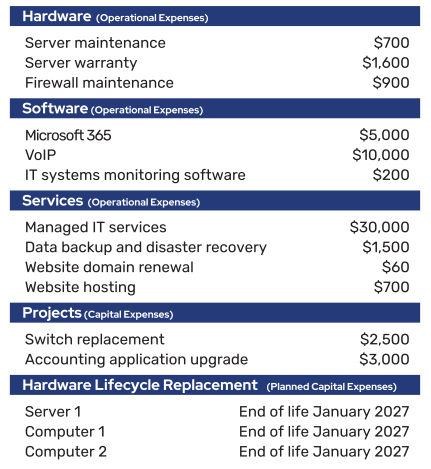
Note that each of the categories are not overwhelming to a small municipality. The few items in the IT budget all fit within the structure. Operational and capital expenses are noted, and most basic IT best practices are followed. The budget gives no insight into how the budget connects with the municipality’s vision, but this will either be more apparent in the overall budget document or give the municipality an opportunity to tie technology and vision together better next year.

MEDIUM MUNICIPALITY BUDGET

In this municipality of 20,000 people, there are simply more components that need to be tracked. They organized information slightly differently although all the components we’ve discussed are included.

As you can see, a larger municipality has more IT “stuff” to track—but the categories we provided in this whitepaper can expand to account for extra line items.

Many municipalities use simple spreadsheets for their IT budgets, especially if they are not terribly complex. Eventually, these IT budgets make their way into the overall municipal budget. Specialized IT budget and strategic planning apps exist that may help with adding structure and sophistication to your process.
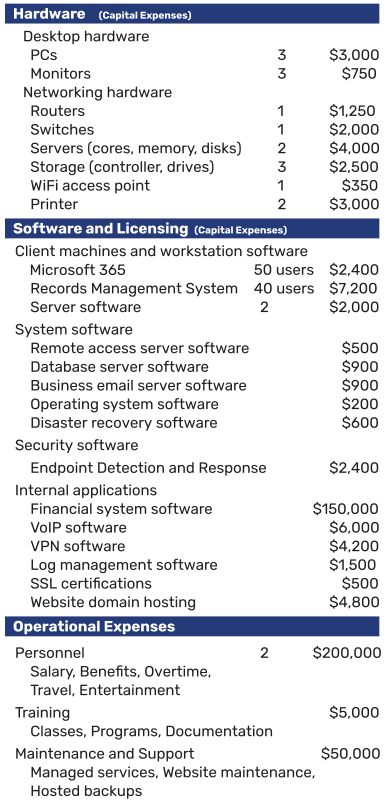
medium muni budget example


Conclusion

 All in all, embrace IT budgeting as an opportunity to enhance your overall municipal budgeting. Once you address your technology and cybersecurity risks, begin to truly maximize your IT investments, and connect your vision with technology, your municipality will make positive leaps forward in ways that you never before imagined.

Need help with IT budgeting?

We’re here to help. Reach out to us today to talk about your IT budgeting gaps and challenges.